Introducing Club Pop-Ups: Put Your Club's Big Message in Front of Every Visitor
If you run a car club website, you know the problem. You post an update and it sinks. Your homepage gets visitors every week, but how many of them notice Saturday's cars-and-coffee, the dues deadline, or the Join button before they leave?
Club Pop-Ups is RumbleSeat's newest club website feature, built to close that gap. It puts one short, well-timed message in front of the people who most need to see it. It matches your club's colors, you build it from your Control Panel, and you never touch code.
Why your club website needs its own announcements
Most clubs already post to Facebook groups, Instagram and a newsletter. Those channels have limits. Social feeds bury posts, members skim email, and a prospective member who finds your club through Google never sees any of it.
Your club website is the one place everyone eventually lands: members checking the calendar, guests reading about the club, and enthusiasts who searched for a club near them. A pop-up makes sure they see what matters most before they go.
What you can do with Club Pop-Ups
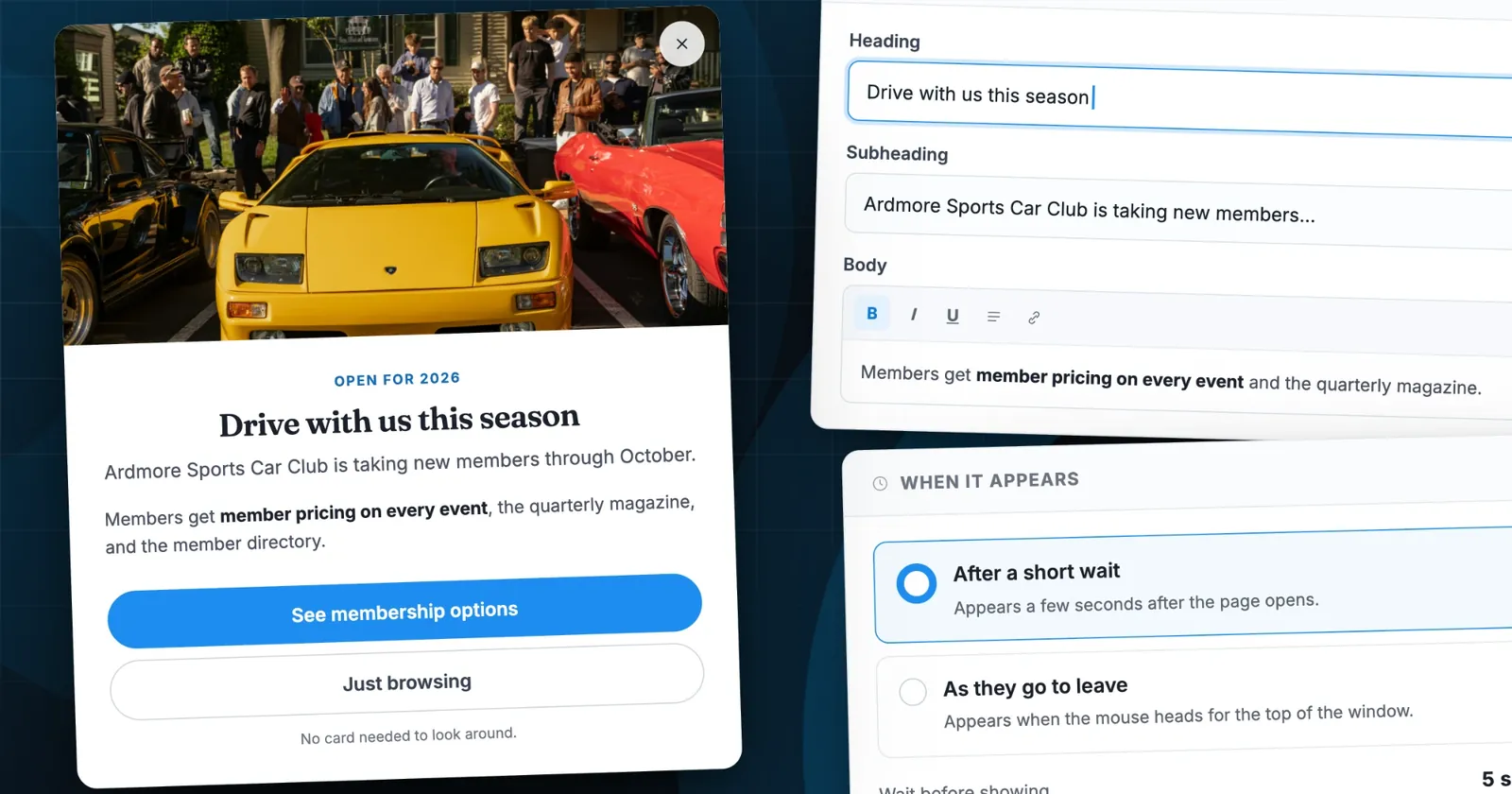
A pop-up holds a heading, a short message, an optional photo and up to two buttons. Everything else is about putting it in front of the right person at the right moment.
Choose who sees it
Every pop-up has an audience:
- Everyone — club news that applies to all visitors.
- People who haven't joined — invitations to join, shown to anyone who isn't a member yet, whether or not they're signed in.
- Members only — dues renewals, meeting reminders and members-only news, shown to signed-in members.
Guests and members can see completely different messages on the same page.
Choose where it runs
Run a pop-up on every page, or pick chosen pages: Home, Events, Forums, Gallery, Directory, Marketplace, Membership, Donate and more, plus any custom page you've built. Promote a charity drive on Home and Donate only, or a rally on the Events page only.
Choose when it appears
- After a short wait — anywhere from 0 to 30 seconds after the page opens. The editor recommends three to five seconds, which visitors dismiss less often.
- As they go to leave — appears when the mouse heads for the top of the window, catching visitors on their way out. On phones and tablets, where there's no mouse, it uses the short wait instead.
Control how often
Pick Once only, Once each visit, or Now and then with a gap you set from 1 to 90 days. Leave Stop once they tap the main button ticked and anyone who has already acted never sees the pop-up again. Members who've renewed stop getting renewal reminders.
Schedule it ahead
Set Starts and Ends dates and a pop-up turns itself on and off. Build the early-bird registration notice now, and it appears on the first day of sales and disappears when they close.
Make it look like your club
Pop-ups use your club's own brand color for the buttons, kicker and links, so they read as part of your site, not as an ad. Add a photo from your last event by uploading it or pasting a web address, with a short description for visitors who use screen readers.
Drive a real action
Every pop-up has a main button, such as See membership options, Register now or Renew your dues, linked to any page on your site or anywhere on the web. An optional second button can link elsewhere or simply close the pop-up. A line of small print underneath, like "No card needed to look around," answers the question that stops people clicking.
Run several, in order
Create as many pop-ups as you like and put them in priority order. A visitor sees at most one pop-up per page view: the first one in your list that applies to them. Turn any pop-up off without losing its wording. One master switch silences them all.
Pop-ups that respect your visitors
Nobody wants a club website that feels like a used-car lot. Club Pop-Ups has guardrails built in:
- A close button always appears. Anyone who closes the same pop-up twice never sees it again. That rule is fixed, so visitors aren't badgered.
- One at a time. Visitors never get a stack of pop-ups on one page.
- Built-in coaching. The editor warns you when a pop-up would appear too fast, when the message runs long ("two short sentences and a button works better"), when a members-only pop-up targets a page members rarely visit, or when an end date has already passed.
- Legal pages stay clear. Pop-ups never appear on your Terms of Use or Privacy Policy.
- Preview before you publish. See it on your site shows the pop-up as a visitor or as a member would see it, and previews don't count as views.
Ideas for your first pop-up
A few ways a club might put pop-ups to work:
- A membership drive. Show "Drive with us this season" to people who haven't joined, on Home and Membership, during the weeks around your biggest local show. Pair it with our guide to growing your car club's membership.
- An event push. Promote the annual charity cruise on Home and Events, once per visitor, scheduled to end the day registration closes. If you sell tickets online, link the button to your event registration page.
- A dues reminder. Show members only a renewal notice that stops once they tap Renew your dues. It works alongside online dues collection.
- A time-sensitive vote. Remind signed-in members about a bylaws vote, with an end date set for the day voting closes.
None of these needs a developer, a CSS edit or a support ticket. Each takes a few minutes in the Control Panel.
How to set up your first pop-up
Club owners and admins can find pop-ups in the Control Panel:
- Open your club site and open the Control Panel.
- On the Features tab, find the Marketing group and click the pencil on the Pop-ups row.
- Click New pop-up, give it a name only you'll see, and write a heading, a short message and your main button.
- Pick Who sees it, Where it runs, When it appears and How often they see it.
- Click See it on your site to check it, then click Save. It goes live for visitors right away.
For every field, limit and setting, see the full pop-ups help guide.
Frequently asked questions
Can visitors see more than one pop-up at a time?
No. A visitor sees one pop-up per page view, chosen by your list order, and none after they close it.
Can I show different pop-ups to members and non-members?
Yes. Set one pop-up to People who haven't joined and another to Members only, and each audience sees its own message.
Do pop-ups work on phones?
Yes. On phones and tablets, pop-ups appear after the wait you set. As they go to leave relies on mouse movement, so on touch screens it uses the wait instead.
Can I pause a pop-up without deleting it?
Yes. Switch it off and it keeps all its settings until you turn it back on. To pause every pop-up at once, turn off Show pop-ups on your site.
Who can create pop-ups?
Club owners and full admins. Delegated roles, including Site Manager, can't open the Pop-ups editor. See our guide to roles and permissions.
The bigger picture
Club Pop-Ups is part of a bigger aim. RumbleSeat wants to give car club organizers real marketing and membership tools, not just a static website. It sits alongside custom forms, event registration, dues collection and the rest of our car club management software. If your announcements keep getting lost, it was built for exactly that problem.
Ready to try it? Open your club site's Control Panel, go to Features → Marketing → Pop-ups, and publish your first pop-up today.
Powered by RumbleSeat — the all-in-one platform for car clubs, digital garages, and the automotive marketplace.
Start your club free